
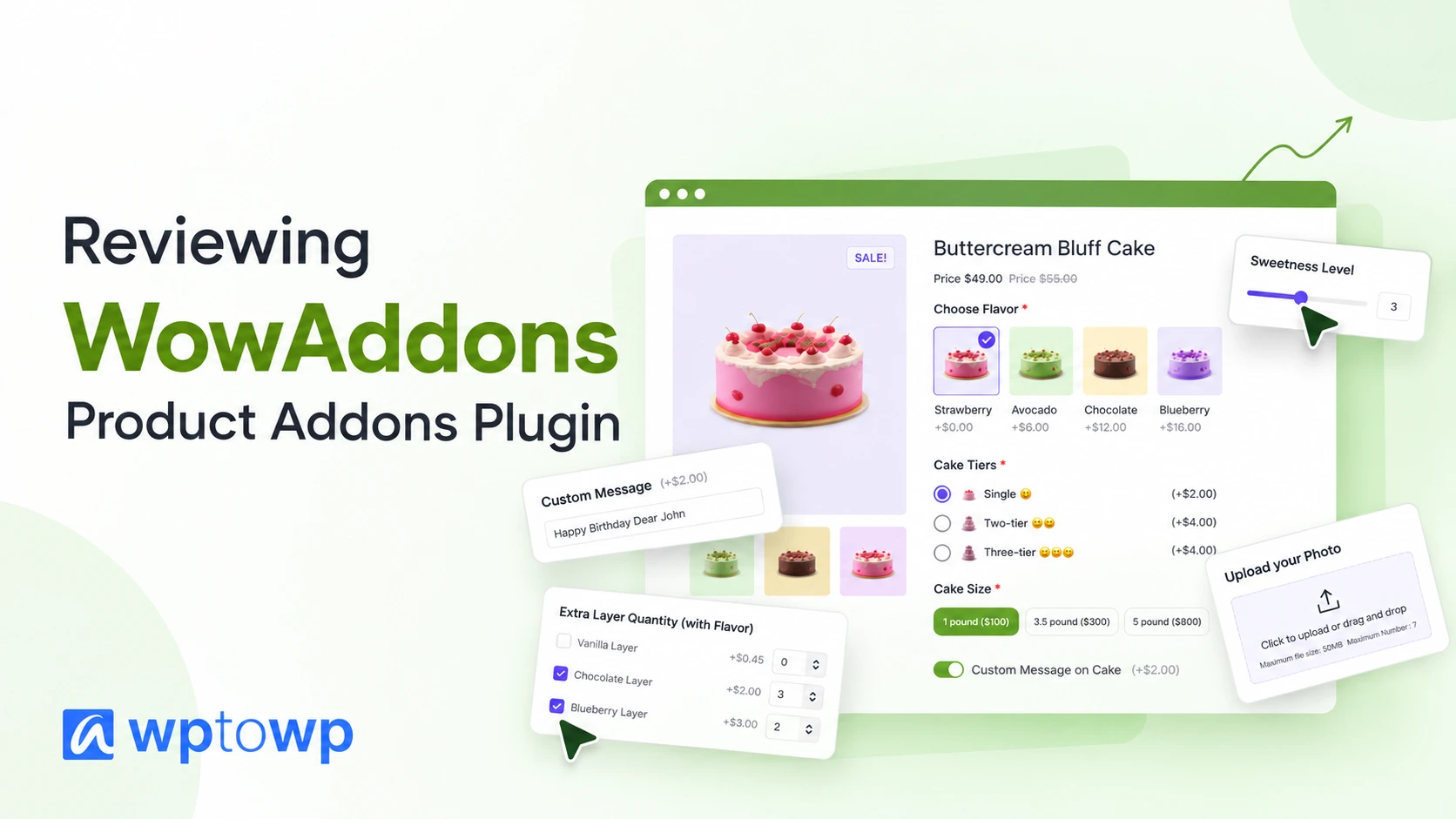
WowAddons Review 2026 – WooCommerce Product Addons Plugin
Want to modernize your WooCommerce product options and move beyond the boring, classic look? Meet WowAddons! It lets you create more engaging product pages with customizable options, giving your customers a better shopping experience.
Selling customizable products with WooCommerce sounds simple until you actually try to set everything up.
Let’s say you sell personalized t-shirts. You want customers to choose a color, add custom text, upload their own design, and pay extra for premium printing. But setting up all these options with default WooCommerce features isn’t exactly straightforward.
That’s where product addons plugins come in.
Among the many options available, WowAddons has become an interesting choice for WooCommerce store owners. It offers 25+ custom fields, a visual drag-and-drop builder, conditional logic, dynamic pricing, product recommendations, and even sales analytics.
And perhaps the most appealing part? You can access these features at a competitive price, with a lifetime deal that can save you hundreds of dollars over time.
But is WowAddons actually worth using? How does it compare with other WooCommerce product addons plugins?
In this WowAddons review, we’ll explore its features, practical use cases, pricing, and limitations to help you decide.
WowAddons Review Deep Dive
WowAddons is a WooCommerce product addons plugin developed by WPXPO. It allows store owners to add extra option fields to product pages without writing code.
Think of it as a way to give customers more control over what they’re purchasing.
Instead of selling a regular product with limited options, you can allow customers to personalize different aspects of their orders. For example, imagine you’re selling a leather wallet. With WowAddons, you can let customers:
- Enter their initials for engraving.
- Choose their preferred leather color.
- Select a gift box or premium packaging.
- Add a personalized message.
- Pay additional charges for customization.
All these options can appear directly on the product page, allowing customers to personalize their purchases before adding them to the cart.
More Than Just a Custom Fields Plugin
What makes WowAddons interesting is that it goes beyond collecting customer information.
You can use it to charge extra for premium options, display complementary products, and make complicated customization processes easier with conditional logic.
For example, a customer buying a birthday cake can select a larger size, choose additional toppings, and add a personalized message.
Each selection can affect the final price automatically. This makes WowAddons useful for stores that want to offer personalized products while creating opportunities to earn more from each order.
What Makes WowAddons Stand Out?
Plenty of WooCommerce plugins let you add text boxes or dropdowns to product pages. The real difference is how easily you can manage those fields, customize their appearance, and use them to support your business. Here’s where WowAddons offers some practical advantages.
Over 25 Custom Fields for Different Product Types
One of WowAddons’ biggest strengths is its range of custom fields. You get more than 25 different field types, covering everything from simple product personalization to more advanced configurations. Some of the available fields include:
| Field Type | Practical Use Case |
| Text and Text Area | Names, engraving, and personalized messages |
| Image and Color Swatches | Selecting colors, patterns, and designs |
| File Upload | Uploading logos, artwork, and photographs |
| Radio Buttons and Checkboxes | Choosing additional services or product extras |
| Dropdown | Selecting packaging, materials, or customization options |
| Date and Time | Delivery dates, appointments, and pickup schedules |
| Range Slider | Selecting measurements or numerical values |
| Product Field | Offering related products as additional purchases |
| Font Picker | Choosing fonts for personalized text |
| Advanced Formula | Calculating prices based on customer inputs |
Different businesses need different customization options. A jewelry store may need engraving fields and gift packaging, while a print-on-demand business needs file uploads, color selection, and size-based pricing.
Having so many field types in one plugin reduces the need to install separate extensions for each requirement. That’s particularly useful for growing stores with a diverse product catalog.
A Visual Drag-and-Drop Builder That Makes Setup Easier
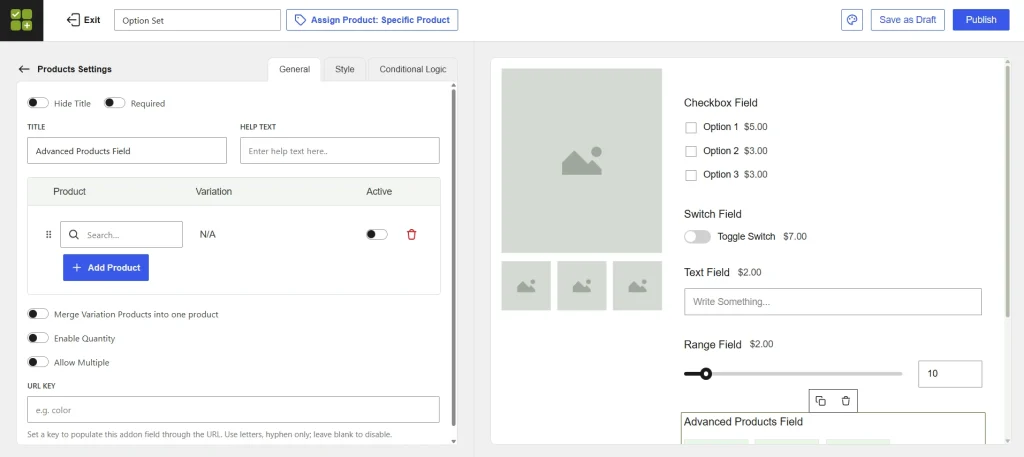
Having dozens of fields wouldn’t mean much if configuring them were complicated. Fortunately, WowAddons provides a visual builder where you can add, arrange, and customize fields from one interface.
You can choose the field you need, configure its settings, and organize the fields based on how you want customers to interact with them.
The builder also supports field duplication, reordering, and sections to organize more complex options.
For example, if you’re selling custom apparel, you can organize the customization process into sections for fabric, design, personalization, and additional services.
Another useful feature is the ability to assign addon configurations to specific products, categories, or your entire store.
So, if you sell 50 personalized t-shirts, you don’t necessarily need to recreate the same fields 50 times. You can configure an addon set once and apply it to relevant products.
Conditional Logic That Keeps Product Pages Clean
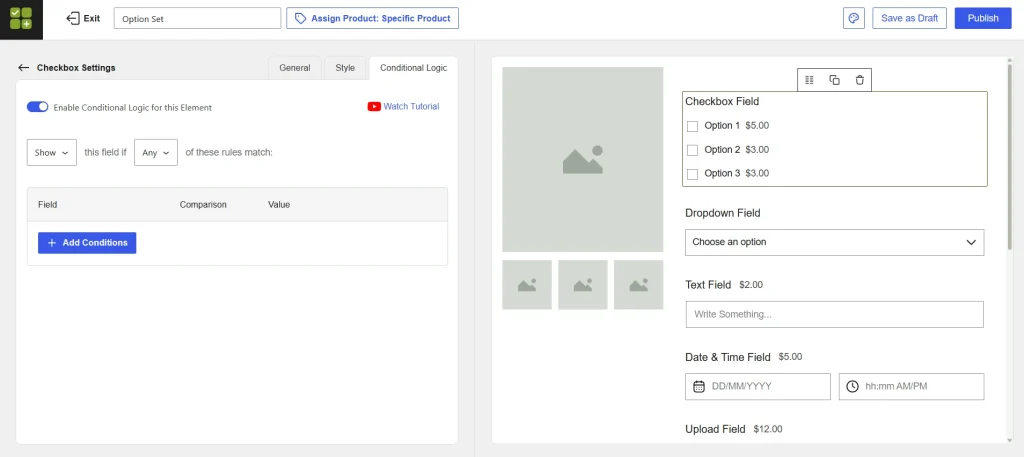
Here’s a problem with offering too many customization options. Not every customer needs to see every field.
Let’s say, you’re selling personalized coffee mugs. Some customers want their names printed on the mugs, while others prefer the original design.
Showing everyone the same customization fields can make the product page unnecessarily complicated. WowAddons addresses this with conditional logic. You can display or hide fields based on previous customer selections.
Want personalized text?
- If the customer selects “Yes,” show the text input field.
- If they select “No,” keep the customization field hidden.
You can build more advanced rules for different product configurations, including conditions based on WooCommerce product attributes.
Dynamic Pricing That Helps You Charge for Customization
For many businesses, customization isn’t just an added convenience. It’s another revenue opportunity. A customer may happily pay extra for premium packaging, special materials, or personalized designs.
But manually calculating these charges can become difficult, particularly when products have multiple options.
WowAddons supports real-time price adjustments based on customer selections. For example, consider a customizable hoodie priced at $40.
| Customer Selection | Additional Charge |
| Base Hoodie | $40 |
| Premium Fabric | +$8 |
| Custom Name Printing | +$5 |
| Gift Packaging | +$4 |
| Final Price | $57 |
Instead of manually updating the total, WowAddons can calculate the additional charges as customers select their preferred options. The plugin also supports more advanced pricing requirements, including formula-based calculations.
This is particularly useful for businesses selling products where prices depend on measurements, quantities, or other customer inputs.
Complementary Product Offers for Additional Sales
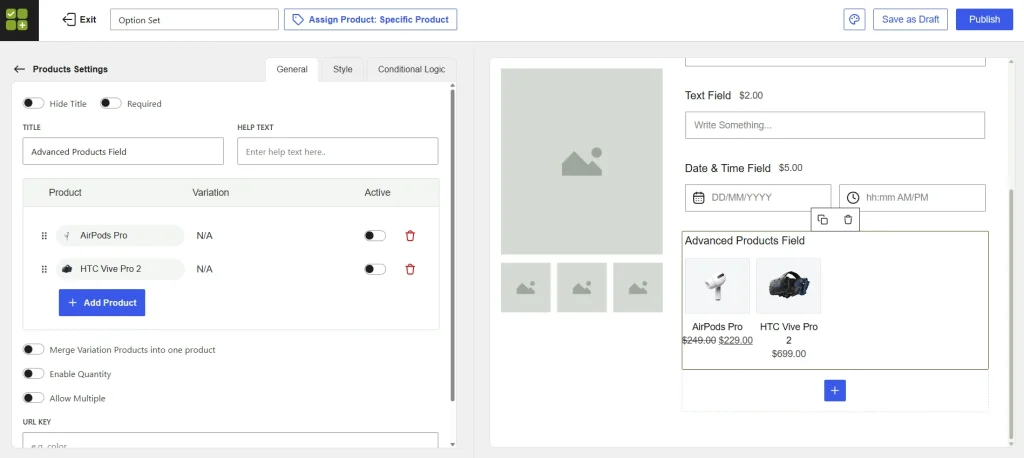
This is a feature that makes WowAddons more than a typical custom fields plugin. Alongside traditional customization options, it includes a Product Field that lets merchants offer complementary products.
Let’s say someone is buying a gaming PC.
You could offer an HTC Vive Pro 2 VR headset or AirPods Pro as additional purchases directly from the product page. Customers can select these products and add them to their orders without browsing separate product pages.
Similarly, a jewelry store can recommend a gift box or matching accessory. These offers create opportunities to increase average order value without forcing customers to visit multiple product pages.
Built-In Analytics to Understand Performance
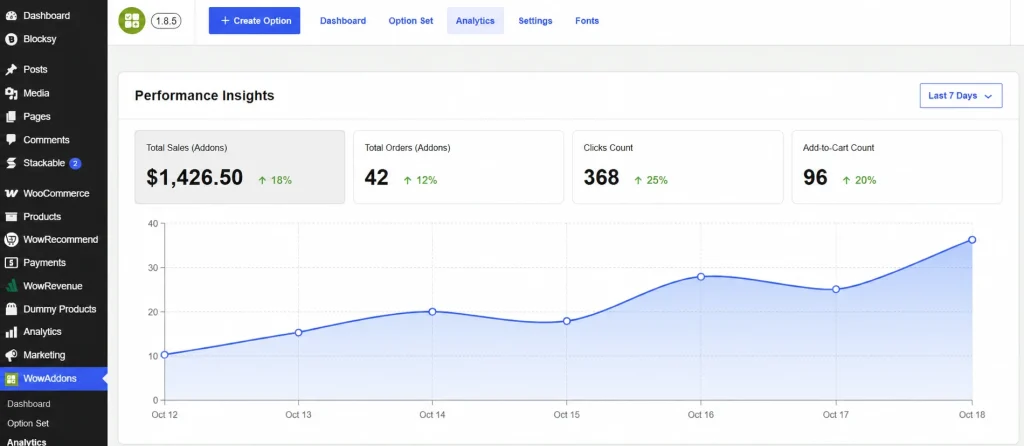
Most store owners focus on creating product addons but rarely think about measuring their performance. Which customization options are customers interacting with? Which extras contribute to actual purchases?
WowAddons includes an analytics dashboard that tracks add-on-related metrics such as clicks, add-to-cart activity, order counts, and sales amounts.
This information can help merchants identify which options are attracting customer interest. For example, if premium gift packaging receives plenty of clicks but relatively few purchases, you may reconsider its pricing or presentation.
These are useful insights for improving the product customization experience over time.
How to Customize WooCommerce Products With WowAddons?
Let’s look at a practical example of customizing a WooCommerce product using WowAddons.
Suppose you’re selling a Classic Sweater. You want customers to choose their preferred color, add personalized text, upload custom designs, and select additional options.
Here’s how easily you can set everything up.
Step 1: Create a New Addon
Open the WowAddons dashboard and create a new option set.
Assign it to your sweater product or multiple products if you want to use the same customization options elsewhere.
Step 2: Add Your Customization Fields
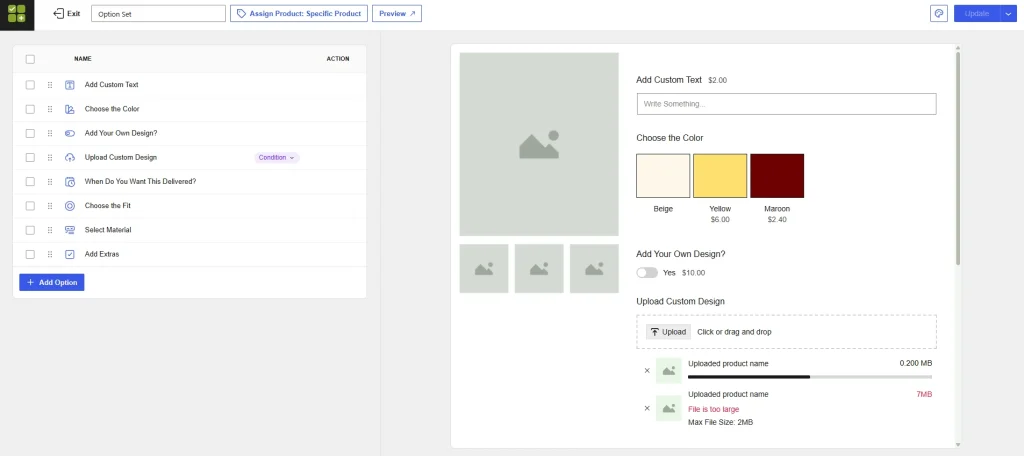
Using the drag-and-drop builder, add the fields you need.
For our sweater, we’ve added custom text, color swatches (Beige, Yellow, and Maroon), design upload, delivery date, fit, material selection, and additional extras.
You can arrange the fields however you like and preview them in real time.
Step 3: Set Up Pricing and Conditional Logic
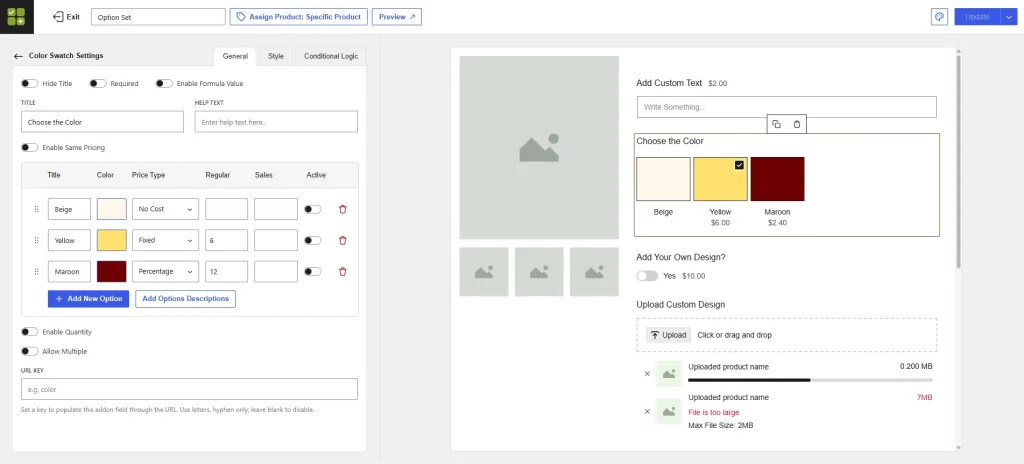
Now, configure each field with the appropriate settings.
For example, customers can add personalized text for $2, select Yellow for an additional $6, or choose to upload their own design for $10.
You can also use conditional logic to show the design upload field only when customers enable the “Add Your Own Design?” option.
Step 4: Publish and Preview Your Product
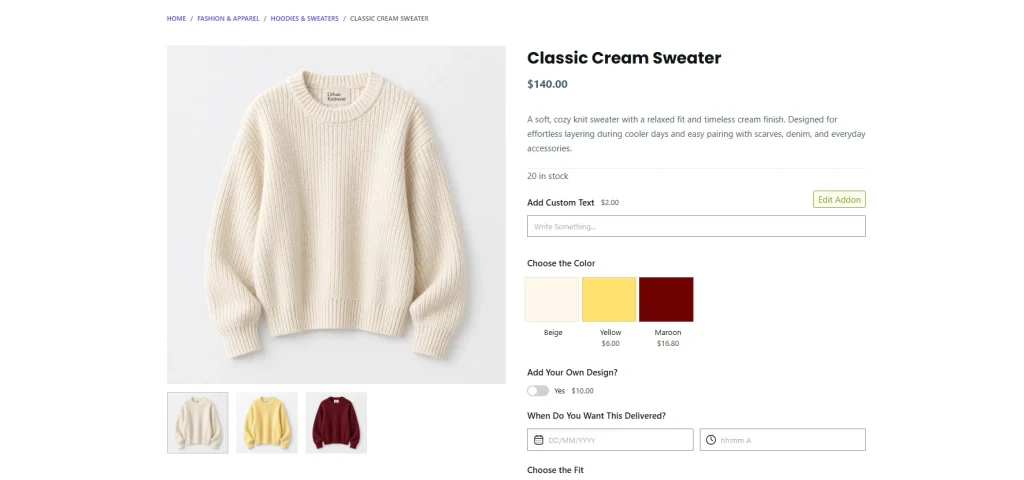
Once everything looks good, publish the option set and visit the sweater’s product page.
You’ll see the customization fields displayed alongside the product, allowing customers to personalize their sweaters and see additional charges before purchasing.
That’s it! You’ve created a customizable WooCommerce product without writing a single line of code.
Where Does WowAddons Work Best?
WowAddons is useful for almost any WooCommerce store that sells customizable products. However, some businesses can benefit more from its flexible fields, dynamic pricing, and conditional logic. Here are a few practical examples:
| Business Type | How You Can Use WowAddons |
| Personalized Gifts & Jewelry | Let customers add engravings, personalized messages, gift packaging, and preferred delivery dates. |
| Clothing & Custom Apparel | Offer color swatches, custom embroidery, design uploads, fabric choices, and premium printing options. |
| Print-on-Demand Products | Allow customers to upload artwork, select finishes, and personalize mugs, posters, phone cases, and more. |
| Food & Bakery Stores | Let shoppers choose cake sizes, pizza toppings, flavors, decorations, and other paid extras. |
| Made-to-Order Products | Collect custom measurements, material preferences, and special instructions with flexible pricing options. |
For example, a bakery can charge extra for premium cake toppings, while a clothing store can offer paid embroidery or custom printing.
With WowAddons, merchants can manage these options directly from the product page. And with conditional logic, they can show only the relevant customization fields based on each customer’s selections.
WowAddons Pros and Limitations: What Should You Know?
So far, WowAddons offers plenty of reasons to consider it. But a balanced review should also look at where it may not be the ideal solution.
What We Like About WowAddons
Wide customization options in one plugin. With over 25 field types, store owners can create a variety of product configurations without installing a different extension for every requirement.
Useful selling features beyond customization. Dynamic pricing, complementary product offers, and analytics give merchants tools to monetize and evaluate their product addons.
An approachable visual builder. Drag-and-drop field management, styling controls, and reusable addon configurations can make everyday management easier.
A free starting point. Store owners can explore essential addon functionality before deciding whether they need premium features.
Competitive lifetime pricing. The 25-site lifetime license is particularly appealing for agencies and businesses planning to use WowAddons over several years.
Where WowAddons can Be Better
Some advanced features require Pro. Although the free version includes useful fields, features such as advanced formula pricing and some advanced field configurations require a premium license.
Complex configurations still need careful setup. Conditional logic and pricing formulas offer flexibility, but stores with many dependent options should thoroughly test their configurations.
WowAddons Pricing (Value for Money?)
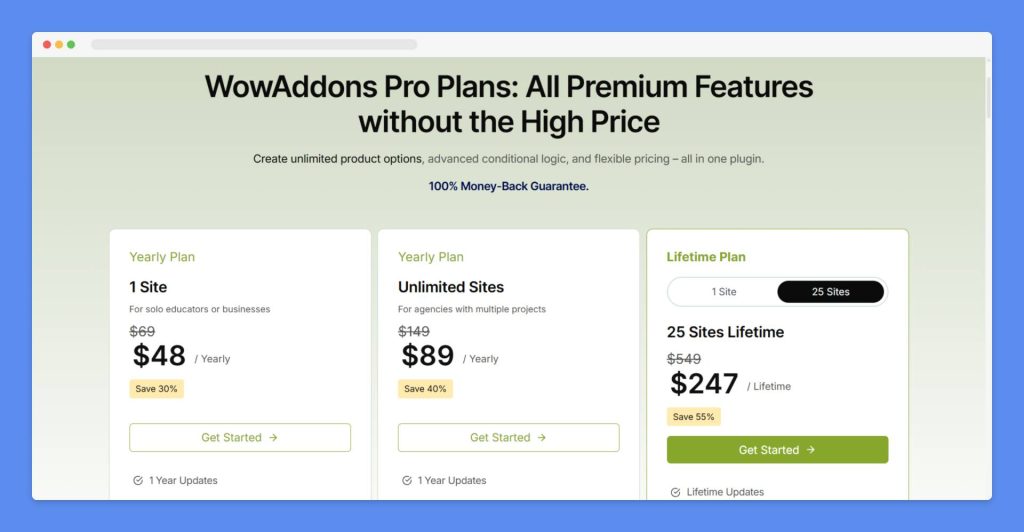
WowAddons comes with a unique pricing style rather than a 3-tier generic style like some other popular plugins. You can get started for only $69. You can also choose an unlimited site license for a yearly fee. There are also lifetime license options. Both premium plans include all Pro features, one year of updates, and priority support.
Want to try before purchasing the plugin? Well, the free version is available on the WordPress directory.
WowAddons also comes with a 14-day money-back guarantee. It gives you time to evaluate the plugin after purchasing. However, these are introductory prices, and renewals are charged at the regular price. The pricing may change, so check the official website before making your purchase.
Who Makes WowAddons?
WowAddons is developed by WPXPO, a WordPress product company founded in 2020. Besides WowAddons, WPXPO has developed several other WordPress plugins. It has PostX, a popular solution for creating blog, news, and magazine layouts, and WowStore, a WooCommerce store builder.
WPXPO’s official website reports over 65k+ users around the globe. And PostX has accumulated more than 2 million downloads. These figures provide useful context about the company’s experience in the WordPress ecosystem.
Editorial Prediction for WowAddons
We believe WowAddons has strong potential to perform well. With AI increasing competition and many users moving away from WooCommerce, we expect that existing users and newcomers will still choose WowAddons. This is a collaborative blog, but our experience with the product has been positive. However, it is still too early to predict its active installations over the coming year.
Other WPXPO’s Product Reviews
WPXPO offers a wide range of WordPress products, and we’ve published reviews and tutorials covering several of them. Let’s explore our other WPXPO product reviews and see what each one has to offer.
So, Is WowAddons Worth Using in 2026?
After looking at its features, use cases, pricing, and user feedback, WowAddons stands out as one of the best product addons plugins for WooCommerce product customization.
It provides the essential tools merchants need to collect customer preferences, offer personalized products, and charge for additional options.
But its appeal goes beyond the number of available fields.
Features such as conditional logic, real-time pricing, complementary product offers, and analytics help turn basic customization fields into useful selling tools.
The pricing also makes a strong case for considering WowAddons, particularly for agencies.
While competing plugins such as Barn2, Acowebs, and ThemeHigh offer their own advantages, WowAddons’ combination of features and affordable multi-site lifetime licensing makes it a better contender.
👉 Important: This is a collaborative review, and it has been written by the WPXPO team, AI, and Wptowp editorial.
Acknowledgment 💯💯
🐾 Images – Images in this blog have been collected from different websites, blogs, landing pages, plugin landing pages, WordPress directories, Social sites, etc
🐾 Affiliate Links – This blog contains several affiliate links. If you purchase any product through the link, we will get a commission without charging you extra. You can see affiliates’ declarations here.
🐾 Data Source – All the data has been collected from various open sources like landing pages, WordPress directories, YouTube channels, etc. Data can be changed at any time.

Editorial Staff
Our editorial team consists of WordPress expert(s), analysts, content editors, writers, designers, SEO experts, outreach people, and developers! For each piece of content, a highly expert and dedicated team led by Asadullah Galib works together. We have only one motto: “We help you to make your final decisions!”