

ARMember Review 2026 – Get A Membership Plugin with 62+ features
ARMember plugin came to our radar when we published our 11+ Top WordPress Membership Plugins blog. It stood out as one of the most feature-heavy options for its price. And in this blog, we’ll take a deeper look at the ARMember review.
ARMember is a WordPress membership plugin by definition. It manages subscriptions, paywalls, online courses, digital downloads, and member communities from a single dashboard.
ARMember is built by the same team behind BookingPress, ARForms, ARPrice, and AffiliatePress. It has 50,000+ users and comes with 22+ payment gateways and 62+ add-ons.
ARMember Review – Quick Verdict
ARMember is a mature, all-in-one membership plugin with a long feature list. It covers content restriction, recurring subscriptions, drip content, forms, profiles, and security in every paid plan.
ARMember is built for anyone who wants to charge for access to content. That includes bloggers, video creators, podcasters, associations, and online communities. It’s not a niche tool; it tries to cover almost every membership model.
Best Features of ARMember Plugin
ARMember has a long feature list, so we grouped the main ones below. The full list of features is available on the plugin landing page.
Content Restriction and Paywall
Content restriction is the heart of any membership plugin, and ARMember gives you several ways to do it. You can lock full pages, posts, categories, menus, and forums. You can also restrict specific URLs.
For partial content, a shortcode lets you hide part of a post from non-members. Show the first few paragraphs, then ask readers to join. There’s also a user-wise private content option, which shows specific content to specific members only.
Membership Subscriptions and Pricing Models
You can create unlimited membership plans, both free and paid. ARMember supports several pricing models. Members can also upgrade, downgrade, renew, or cancel their plans from their own panel.
Drip Content (Content Scheduling)
Drip content keeps members coming back. ARMember lets you release pages and posts by date, time, or how long someone has been subscribed. You can drip part of a post with a shortcode too.
One feature we liked: you can limit how long dripped content stays open. For example, a lesson stays available for seven days, then locks again. That creates urgency and protects premium material.
Form Builder, Profiles, and Member Directories
ARMember includes a live form builder for registration, login, and password reset forms. It comes with ready-made templates, and the forms can open in a modal popup. So you don’t need a separate popup plugin.
Members get public profiles with photos, bios, social links, and digital membership cards. You can also build searchable member directories from templates. This is useful for associations and professional networks.
Community and Gamification
ARMember adds points, badges, and achievements to reward member activity. It also integrates with BuddyPress and BuddyBoss for forums and social features. The full Social Community add-on (profiles, friendships, messaging, groups) is part of the Enterprise plan.
Built-in Security Options
This is where ARMember is different from most membership plugins. It includes security tools that you would usually get from a separate plugin. The shared-account lock is especially useful. If one paid member gives their password to five friends, you lose five sales. ARMember tries to stop that.
Things You Can Build with ARMember
A membership plugin turns your website into a place people pay to enter. Here’s what the official site says you can build with ARMember.
- Membership associations – Manage members, renewals, and membership cards.
- Online communities – Profiles, directories, badges, and BuddyPress or BuddyBoss forums.
- Video membership sites – Lock video libraries behind a subscription.
- Podcast membership sites – Offer exclusive episodes to paying subscribers.
- Member directories – Searchable directories for professional networks.
- Online course platforms – Lessons, quizzes, and certificates with the Online Courses add-on.
- Digital download stores – Sell eBooks, files, and media with plans.
That’s a wide range. Most plugins in this space pick two or three of these. ARMember tries to do all of them.
ARMember Pricing
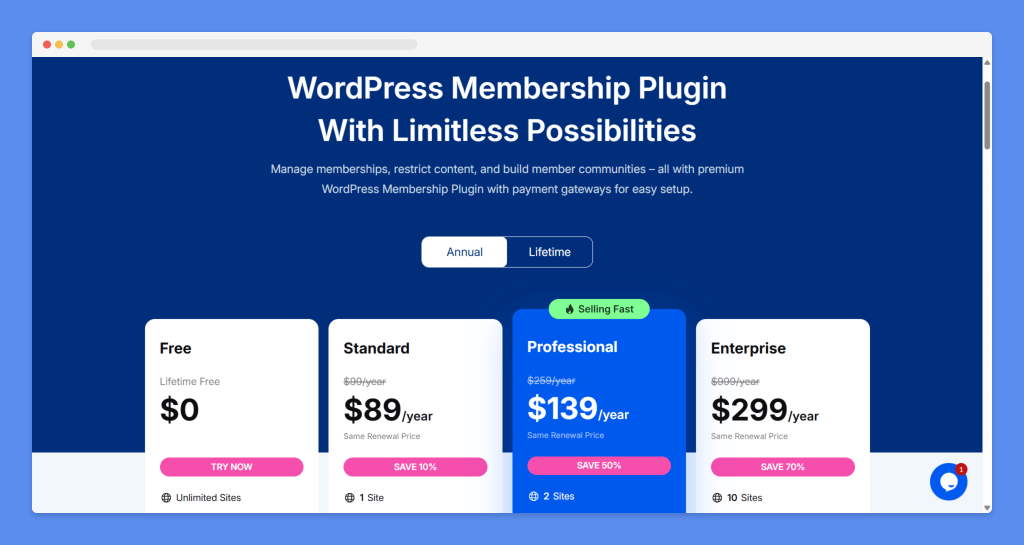
ARMember has a free version and three paid plans. Each paid plan comes in an annual or a lifetime option. Here are the plans on the official pricing page.
| Plan | Annual | Lifetime | Sites |
|---|---|---|---|
| Free (Lite) | $0 | –$0 | Unlimited |
| Standard | $89/year | $229 | 1 |
| Professional | $139/year | $379 | 2 |
| Enterprise | $299/year | $599 | 10 |
At $89 a year, ARMember Standard costs less than a family pizza night each month. For a plugin that might run your whole business, that’s not bad.
ARMember Review Spotlight (USPs)
Many membership plugins look cheap at first, then charge extra for each add-on. Here’s what makes ARMember different.
- Add-ons included in the plan – No separate add-on store to buy from.
- 22+ native payment gateways – Including regional ones like Razorpay, Paystack, CCAvenue, and Mercado Pago.
- Built-in security – Login protection, hidden login URL, CAPTCHA, and 2FA without an extra plugin.
- Shared-account auto-lock – Stops one paid account from being used by many people.
- Lower starting price – $89/year for one site, well below MemberPress or Paid Memberships Pro.
- Same renewal price – No surprise jump in year two, according to the pricing page.
ARMember shows several customer testimonials on its site. Users praise the easy setup, the clean interface, and helpful support. One user, however, asked for clearer explanations in the user guide. That’s a fair point, and we cover it below.
No plugin is perfect. Here’s where ARMember has gaps.
- Courses and community cost more. These are the features many people want most, and they’re only in the $299/year Enterprise plan.
- Beginners will need time to explore all features. Since ARMember comes with over 62 built-in add-ons and 56+ premium addons, beginners will need time to explore every feature (But its excellent customer support, documentation and video tutorials helped a lot whenever I was ever left wondering).
Team Behind ARMember
ARMember is built by Repute Infosystems. The same team makes BookingPress, ARForms, ARPrice, and AffiliatePress. It has ratings of 4.4/5 on Trustpilot and 4.6/5 on Trustindex
Editorial Prediction for ARMember
Our editorial team believes ARMember’s biggest strength is value. You get a lot of membership features for a low price, and you don’t have to buy add-ons one by one. That’s a real advantage over MemberPress and Paid Memberships Pro.
Should you use ARMember today?
- Starting a new membership site on a budget? It’s worth a try. Use the 14-day refund window to test it.
- Moving from MemberPress to save money? Test it on a staging site first, and check how your members and payments migrate.
- Selling courses as your main business? Compare it with a dedicated LMS plugin before you buy Enterprise.
For agencies, the Enterprise plan with 10 sites is an interesting one. Just check the current sale price first.
ARMember Plugin FAQs
Do you have any questions about ARMember? Here are the common questions and direct answers.
Is ARMember free?
Yes. ARMember Lite is free and includes unlimited membership plans, 20+ built-in add-ons, and two payment gateways. The paid plans start at $89/year.
Does ARMember support recurring payments?
Yes. You can set weekly, monthly, yearly, or custom billing cycles. You can also offer lifetime plans and pay per post.
Can I sell online courses with ARMember?
Yes, with the Online Courses add-on. It includes lessons, quizzes, and certificates. This add-on is only in the Enterprise plan.
Does ARMember work with WooCommerce and Elementor?
Yes. ARMember integrates with WooCommerce and supports page builders like Elementor, Divi, Bricks, and WPBakery.
Does ARMember have a refund policy?
Yes. ARMember offers a 14-day money-back guarantee on paid plans.
ARMember Review – Final Notes
We believe ARMember delivers on its main promise. It packs a huge number of membership features into one plugin, at a price well below most premium rivals. The built-in security tools and 22+ payment gateways are real bonuses.
It’s a strong pick if you want MemberPress-level features on a budget. It’s a weaker pick if you need courses or community on a lower plan.
Check the current sale price, pick the plan that matches your needs, and use the 14-day refund window to test it properly. Let us know what you think.
I hope you enjoyed this blog. If you have any questions, feedback, or want to talk with us, feel free to use our contact page. And don’t forget to share this blog on your favorite social media. This will help us grow faster.
Acknowledgment 💯💯
🐾 Images – Images in this blog have been collected from different websites, blogs, landing pages, plugin landing pages, WordPress directories, Social sites, etc
🐾 Affiliate Links – This blog contains several affiliate links. If you purchase any product through the link, we will get a commission without charging you extra. You can see affiliates’ declarations here.
🐾 Data Source – All the data has been collected from various open sources like landing pages, WordPress directories, YouTube channels, etc. Data can be changed at any time.

Editorial Staff
Our editorial team consists of WordPress expert(s), analysts, content editors, writers, designers, SEO experts, outreach people, and developers! For each piece of content, a highly expert and dedicated team led by Asadullah Galib works together. We have only one motto: “We help you to make your final decisions!”