
NiroHelp Review – A Smarter Way to Automate Customer Support
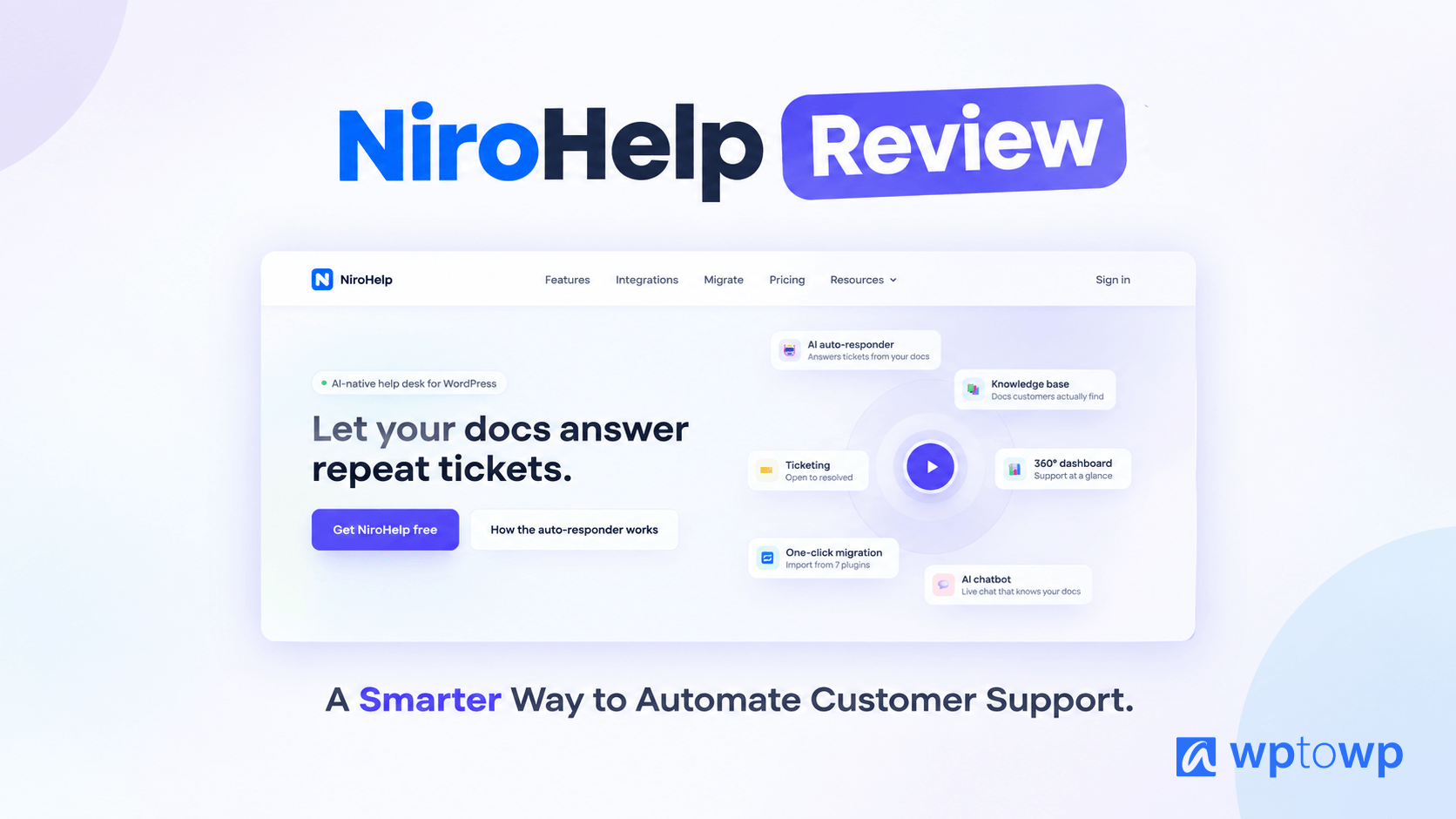
Today, we’ll dive into the NiroHelp Review in this blog. For those who don’t know this plugin yet, NiroHelp is a new AI-powered helpdesk plugin designed to make customer support smarter and more efficient. We’ll explore its key features and see what makes NiroHelp an exciting new option for WordPress support teams.
It’s not just another generic helpdesk plugin. It combines a knowledge base, support tickets, an AI chatbot, automated ticket replies, and much more.
Keeping documentation, tickets, and chat in separate tools adds extra hassle to customer support. An agent may find an answer in a help article, then copy it into another ticket. Meanwhile, the next customer asks the same question through chat.
NiroHelp brings these tasks into one WordPress helpdesk. It combines a knowledge base, support tickets, an AI chatbot, automated ticket replies, and support reporting. Its customer-facing AI uses your synced documentation to answer questions. Human agents handle requests that need more attention.
This review covers how those features work together, what the free version includes, and what to consider before paying for AI.
What Is NiroHelp? A Quick Overview
NiroHelp is an AI-native WordPress helpdesk developed by Codexpert, Inc. It’s the company behind several WordPress and WooCommerce products. It lets customers look for answers in your documentation, ask the chatbot, or submit a support ticket.
Your team manages the documentation and tickets inside WordPress. The optional AI service connects through NiroHelp Cloud. You can use the core helpdesk without that connection.
| Detail | What NiroHelp Offers |
| Category | WordPress helpdesk |
| Core features | Knowledge base, tickets, AI chatbot, AI auto-responder, and analytics |
| Free version | Yes |
| AI features | Paid |
| Agents | Unlimited |
| Tickets | Unlimited |
| Documentation | Unlimited |
| Intended users | WordPress product companies, agencies, and WooCommerce businesses |
NiroHelp Notable Features
1. Knowledge Base: Organize Answers by Topic and Product
NiroHelp includes a WordPress knowledge base for publishing support articles. You can organize those articles with Topics and Products.
Topics group articles into sections such as Getting Started, Configuration, Integrations, Troubleshooting, and Billing and Licensing. Products connect each article to the plugin, theme, service, or other product it covers.
The same Products are available in support tickets. This gives your team a consistent way to organize both documentation and customer requests.
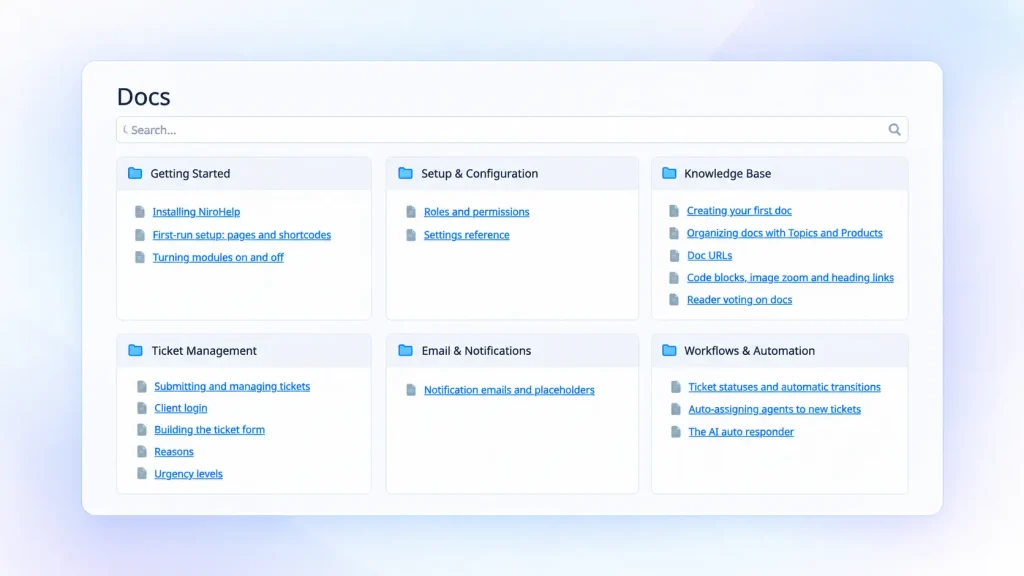
Readers can search the knowledge base, vote on articles, and move between pages with breadcrumbs and previous or next links. You can also configure document URLs.
These articles serve two purposes. Customers can read them for help, and NiroHelp’s AI can use the synced content to answer questions.
2. Customer Support Tickets: Collect Details and Assign Requests
Customers can submit tickets from the front end of your site. They can then follow their conversations through a customer portal.
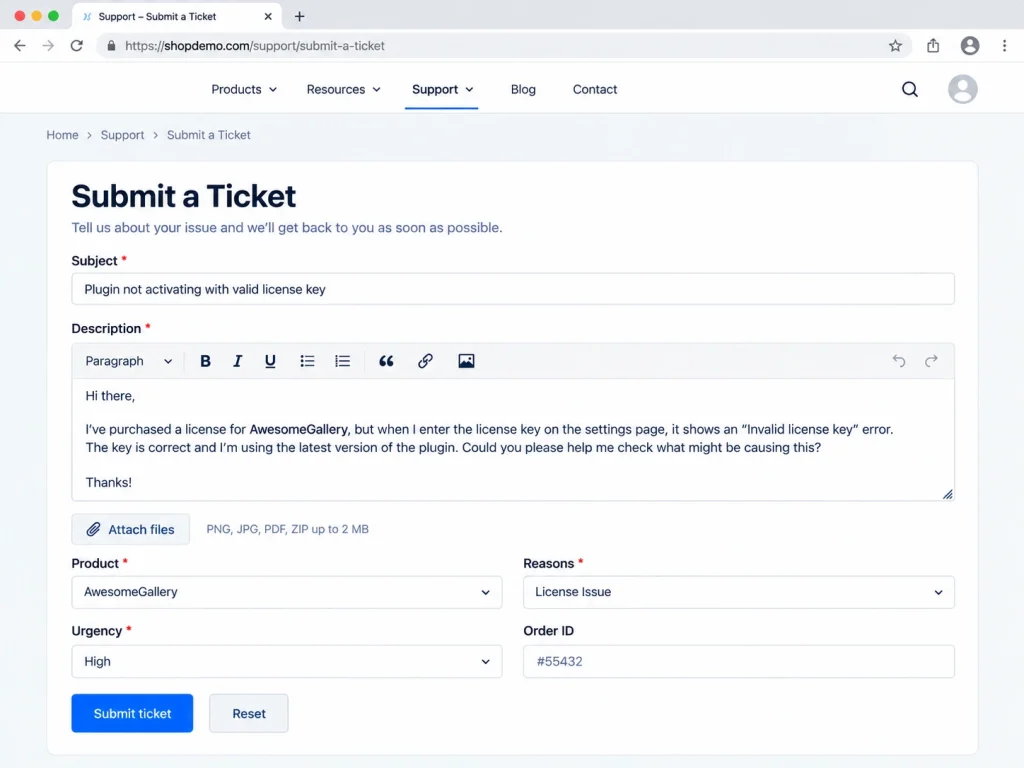
Your team works from a ticket queue with search, filters, statuses, replies, attachments, and internal notes. Ticket fields can collect the product, reason, urgency, order ID, subject, and description. Custom fields let you request other details.
The Reason field describes why someone is contacting support. This differs from Topics, which organize your documentation. For example, a ticket might contain:
| Field | Example |
| Product | WooCommerce Plugin |
| Reason | Bug Report |
| Urgency | High |
| Order ID | #12123 |
Other reasons could include Billing Question, Feature Request, or Pre-Sale Question. These labels help agents understand the request before reading the full conversation.
NiroHelp can also assign tickets automatically. It supports random assignment, round-robin rotation, and assignment to the agent with the lightest workload. This reduces manual sorting before AI handles any replies.
3. AI Chatbot: Answer Questions From Your Documentation
The AI chatbot answers questions using your synced documentation. A customer might ask, “How do I activate my license on another website?” If your docs cover the process, the chatbot can explain it without the customer opening a ticket.
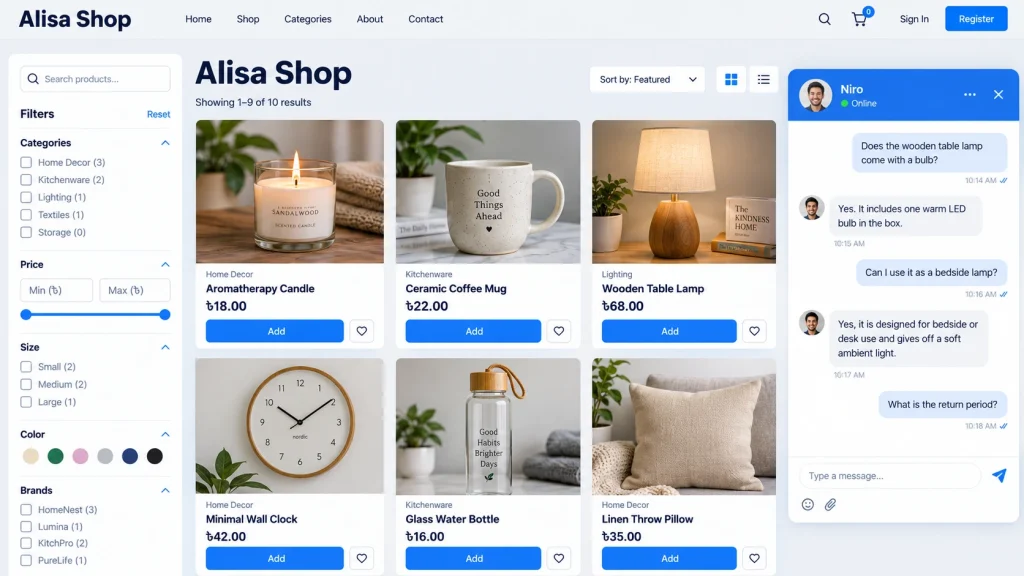
You can customize the chatbot’s name, avatar, colors, welcome message, suggested questions, and launcher position. Page targeting and business-hour settings give you more control over where and when it appears. You can also direct customers toward human support when needed.
The chatbot supports embedding on another website. This can be useful when a company maintains separate sites for its products.
4. AI Auto-Responder: Reply to Tickets That Your Docs Cover
The chatbot helps visitors before they submit a ticket. The auto-responder works on questions that reach your ticket queue.
It searches your synced documentation and evaluates the relevance of the available information. It then checks that result against your configured confidence threshold. You can set the threshold from 0% to 100%. The default is 70%.
For example, a customer might ask, “Where do I change the invoice logo?” A clear help article about that setting may give the AI enough information to respond.
A checkout failure involving a custom ERP integration is a different case. Your docs may not cover that specific issue. When the available information does not meet the threshold, the ticket remains for a human agent.
You can also set a response delay. If an agent replies while the automated response is pending, NiroHelp cancels the AI reply.
The threshold gives teams control over automatic responses. It should not be read as a guarantee that every reply above that threshold is correct.
5. AI Drafts: Let Agents Review Replies Before Sending
Agents can use AI without enabling automatic replies. NiroHelp can generate a suggested response for an agent to review, edit, and send.
This gives teams a practical choice. They can automate routine questions or keep an agent involved in every reply. AI instructions help guide responses, while sentiment analysis helps the team assess the tone of customer conversations.
6. Ask NiroHelp: Query Your Support Data
Ask NiroHelp lets administrators ask questions about their support operation in plain language. Examples include:
- “Which agents are overloaded?”
- “Which tickets need attention?”
- “What documentation are we missing?”
- “Why has our response time increased?”
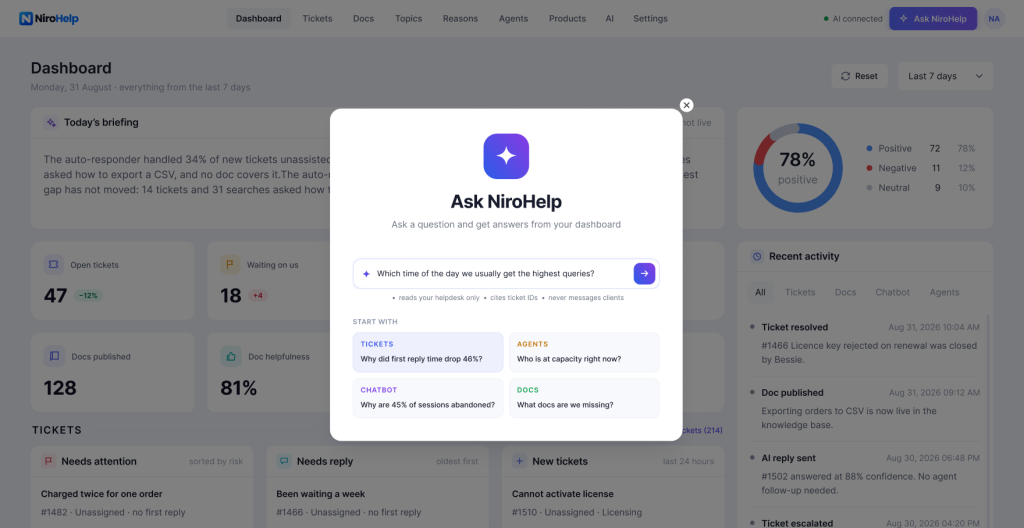
This provides another way to explore support data alongside the dashboard. Ask NiroHelp can also suggest certain support actions. Those actions require confirmation before they run.
7. Dashboard: Track Workload and Find Missing Answers
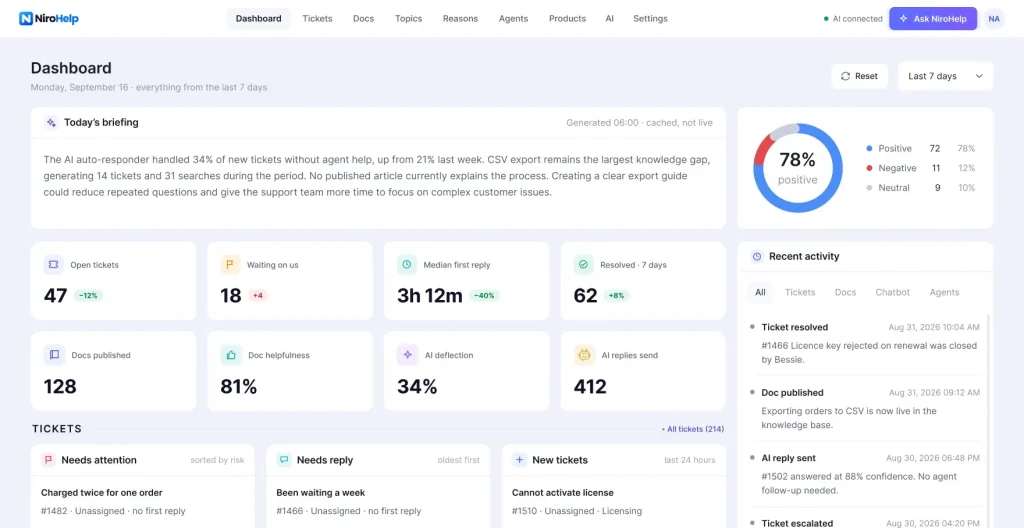
The dashboard brings together information about tickets, documentation, agents, and AI activity. It covers:
- Open and unresolved tickets
- First-response time and agent workload
- Customer sentiment
- AI responses and deflection, or questions handled without a ticket
- Chatbot activity
- Documentation helpfulness
- Unsuccessful searches
- Ticket subjects not covered by documentation
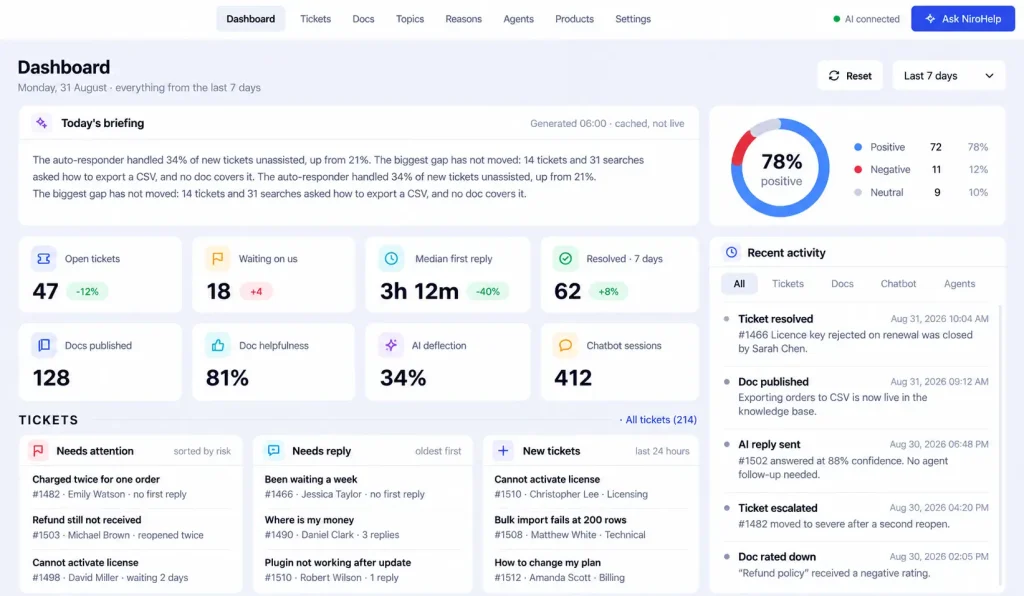
Unsuccessful searches and recurring ticket subjects can help you decide what to document next. For example, repeated searches for an unanswered setup question may point to a missing article.
Once you publish and sync that article, customers and AI can use it for future questions.
Where NiroHelp’s Approach Is Useful
NiroHelp’s main strength is the connection between documentation and support replies. One maintained knowledge base can help customers find answers, give the chatbot source material, and support ticket responses. Your team can then use support activity to identify gaps in those docs.
It also gives teams several levels of control. You can start with human replies, use AI drafts for assistance, or enable automatic responses with a confidence threshold. The response delay helps prevent an automated reply from following an agent’s answer.
The free helpdesk includes unlimited agents, tickets, and documentation. Adding another support agent therefore does not require an upgrade simply to get another seat. Paid AI usage is handled separately through credits.
What Is Free, and What Requires a Paid Plan?
You can use NiroHelp for documentation and ticket management without paying for AI. The free version also includes ticket assignment, the dashboard, migration tools, notifications, and other core helpdesk functions. NiroHelp separates its traditional helpdesk functionality from the optional AI layer.
| Feature | Free Helpdesk | Paid AI Plans |
| Knowledge Base | ✓ | ✓ |
| Support Tickets | ✓ | ✓ |
| Unlimited Agents | ✓ | ✓ |
| Unlimited Tickets | ✓ | ✓ |
| Unlimited Docs | ✓ | ✓ |
| Ticket Assignment | ✓ | ✓ |
| Dashboard | ✓ | ✓ |
| Migration Tools | ✓ | ✓ |
| Email Piping | – | Coming soon |
| AI Chatbot | – | ✓ |
| AI Auto-Responder | – | ✓ |
| Ask NiroHelp | – | ✓ |
| AI Sentiment & Insights | – | ✓ |
So you can start with NiroHelp as a regular WordPress helpdesk and add AI when your support workflow is ready for it.
NiroHelp Pricing and AI Credits
NiroHelp offers monthly, yearly, and lifetime plans. Monthly pricing starts at $9.99. The Starter annual plan is listed at $79.99 for one site, including a 20% early-bird discount. Lifetime plans provide a one-time purchase option.
The paid plans mainly cover AI usage through credits. Chatbot answers, automatic ticket responses, Ask NiroHelp queries, and other AI-assisted actions use those credits.
When the available credits run out, AI features pause until more credits become available. Your knowledge base, tickets, notifications, and other non-AI helpdesk features continue working. This makes the AI allowance an important part of the plan comparison, alongside the payment schedule.
How the Starting Prices Compare with Other Helpdesk Plugins
The table below compares the starting paid prices listed for NiroHelp and three other WordPress helpdesk plugins. The billing periods differ, so the headline prices need some context.
| Plugin | Starting Price | Sites | Key Features |
| NiroHelp | $79.99/year | 1 | Knowledge base, tickets, AI chatbot, and AI auto-responder |
| Support Genix | $59 every six months | 1 | Ticketing, AI, and knowledge base |
| Fluent Support | $103/year | 1 | Ticketing, automation, and AI |
| Awesome Support | $149/year | 1 | Ticketing, extensions, and AI |
NiroHelp’s listed annual price includes its early-bird discount and unlimited agents and tickets. Support Genix’s listed price covers six months. Two billing periods would total $118, assuming the same rate applies to both.
The feature column summarizes each product’s focus. It does not establish that every AI feature is included in the starting plan. Compare AI allowances, paid add-ons, and renewal terms before choosing a plugin.
Prices, discounts, and plan features may change. Confirm the current terms on each provider’s pricing page before purchasing.
Moving Existing Docs and Tickets to NiroHelp
NiroHelp includes migration tools for these WordPress documentation and support plugins:
- BetterDocs
- weDocs
- Echo Knowledge Base
- BasePress
- Awesome Support
- SupportCandy
- JS Help Desk
The data you can import depends on the source plugin. Supported data can include docs, categories, tickets, replies, attachments, products, and other support information.
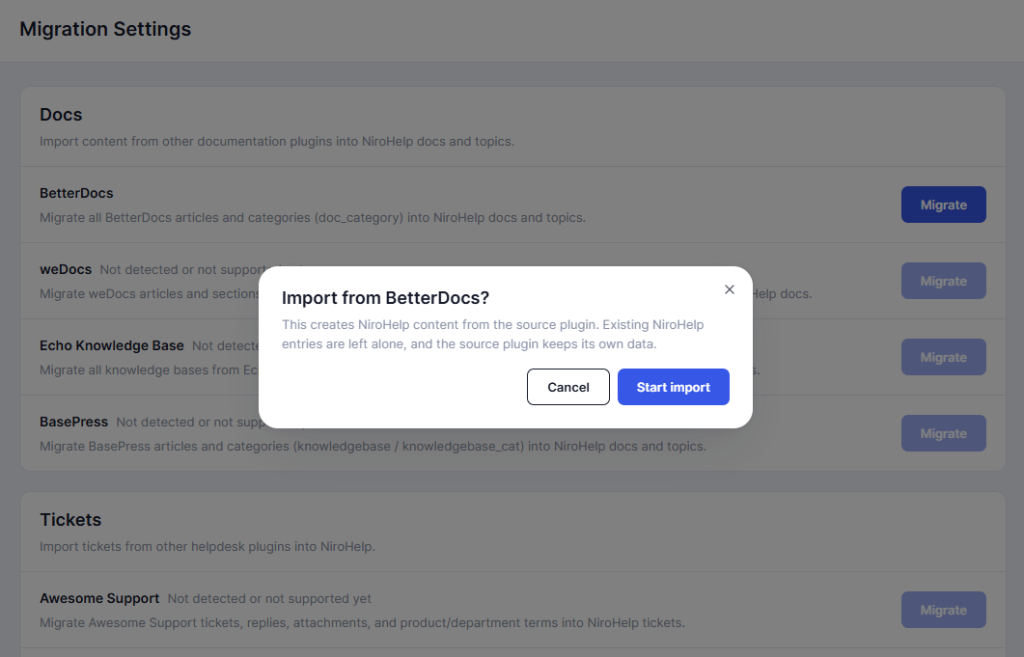
For an established support team, this can reduce the work of moving existing records. Check the importer for your current plugin to see which parts of your documentation and ticket history it supports.
Limitations to Consider Before Switching
(i) AI Depends on the Quality of Your Documentation
The chatbot and auto-responder need useful source material. Missing steps, outdated instructions, and incomplete articles limit the questions they can answer.
Keeping the docs current is therefore part of running the AI features. When your product changes, update the relevant articles and make sure the synced information reflects those changes.
(ii) AI Usage Needs Its Own Budget
Unlimited agents and tickets do not mean unlimited AI usage. The chatbot, auto-responder, AI drafts, and Ask NiroHelp require a paid plan and use credits. Teams with frequent customer questions need to consider the allowance as well as the plan price.
(iii) Email Piping Is Listed as Coming Soon
The feature table lists email piping as a planned paid feature. If converting incoming emails into tickets is essential to your workflow, confirm its availability before moving your support operation.
(iv) The Product Has a Short Public Track Record
NiroHelp is newly launched. It does not yet have the public adoption history of older WordPress helpdesk plugins. Teams that depend on an established ecosystem should weigh that alongside the available features.
Which Teams Are Most Likely to Benefit?
NiroHelp is most relevant to businesses that receive recurring questions and already have answers worth documenting.
| Team | Relevant Use Case |
| WordPress plugin and theme companies | Keep product documentation and technical support together |
| WooCommerce businesses | Manage customer, order, and product questions |
| SaaS teams | Run documentation and ticketing through WordPress |
| Agencies | Organize support for multiple sites or products |
| Small support teams | Reduce the time spent answering repeat questions |
A site with very few support requests may get enough value from the free helpdesk. AI is less likely to help when most cases require a new investigation and have little documented information to draw on.
Final Words: Is NiroHelp Worth Considering?
NiroHelp is worth evaluating if your team manages support in WordPress and repeatedly answers questions already covered in its docs. The free version provides documentation and ticket management. Paid AI adds chatbot answers, ticket automation, reply drafts, and support-data queries.
The decision depends on your documentation, ticket volume, and need for email piping. Try the core workflow with your team first. Then assess whether the available AI credits and response controls suit the questions your customers ask.
Frequently Asked Questions
Is NiroHelp free?
Yes. The free helpdesk includes a knowledge base, support tickets, a dashboard, and unlimited agents, tickets, and docs. AI features require a paid plan.
Can I use NiroHelp without AI?
Yes. The knowledge base, ticketing system, and other core helpdesk features work without connecting the AI service.
Does NiroHelp require an OpenAI API key?
No. NiroHelp Cloud handles the AI service. You do not need to supply an OpenAI or Anthropic API key.
How does the AI answer customer questions?
The chatbot and ticket responder search your synced documentation for relevant information. They use that content to generate answers.
Can NiroHelp reply to support tickets automatically?
Yes. The auto-responder can reply when the available information meets your confidence threshold. Otherwise, the ticket remains for a human agent.
Can I migrate from another WordPress helpdesk?
Yes. NiroHelp includes migration tools for several documentation and support plugins. The records you can import depend on the source plugin.
Acknowledgment 💯💯
🐾 Images – Images in this blog have been collected from different websites, blogs, landing pages, plugin landing pages, WordPress directories, Social sites, etc
🐾 Affiliate Links – This blog contains several affiliate links. We will get a commission without charging you extra if you purchase any product through the link. You can see affiliates’ declarations here.
🐾 Data Source – All the data has been collected from various open sources like landing pages, WordPress directories, YouTube channels, etc. Data can be changed at any time.

Editorial Staff
Our editorial team consists of WordPress expert(s), analysts, content editors, writers, designers, SEO experts, outreach people, and developers! For each piece of content, a highly expert and dedicated team led by Asadullah Galib works together. We have only one motto: “We help you to make your final decisions!”